POS for cafés & coffee shops
A café POS that keeps the queue moving
YellowPOS gives a café a fast counter POS on the phone or tablet at the bar, drink options such as size and milk priced per choice, a QR menu in USD and LBP, and recipe-based stock that knows how much milk and coffee each cup uses. It keeps selling through internet cuts and starts at $15 a month with a 30-day free trial.
30 days free · No card required · Runs on the devices you already have
What slows a café down at the counter?
A queue that builds in seconds
Morning coffee is a volume game. Every extra tap per order, every hunt for the right size or milk, turns into a line out of the door.
Small tickets, two currencies
A $3 latte paid with a 100,000 LBP note needs the change worked out instantly and correctly, hundreds of times a day.
Beans and milk disappear faster than sales explain
Without recipes, you cannot tell whether a missing litre of milk is waste, free drinks for friends, or a portioning problem.
Customers who want to browse before they order
Regulars want to see the seasonal drinks and pastries on their phone at the table, not squint at a chalkboard.
What YellowPOS gives a café
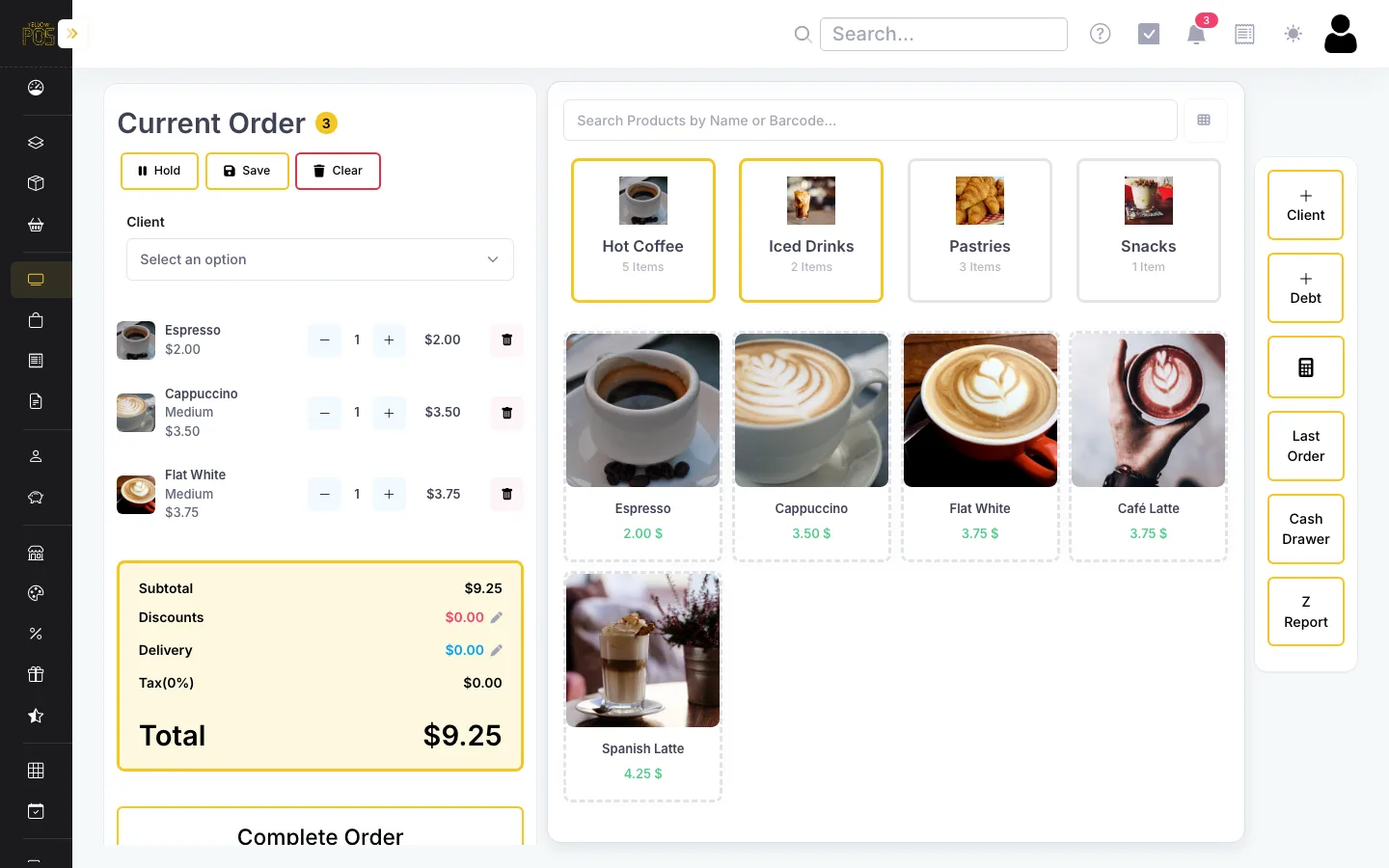
Quick counter checkout
Browse by category or search, tap to add, and take payment in one screen. Product tiles show live stock so the barista knows what is left.
How it works →Sizes, milks, and extras
Variants let one drink come in small, medium, and large, or with oat milk for a price adjustment — no duplicate products to maintain.
How it works →Recipes for every cup
A flat white can use 150 ml of milk and 18 g of beans. Each sale deducts them, so your ingredient stock tracks reality and each drink shows its true cost.
How it works →QR menu with photos
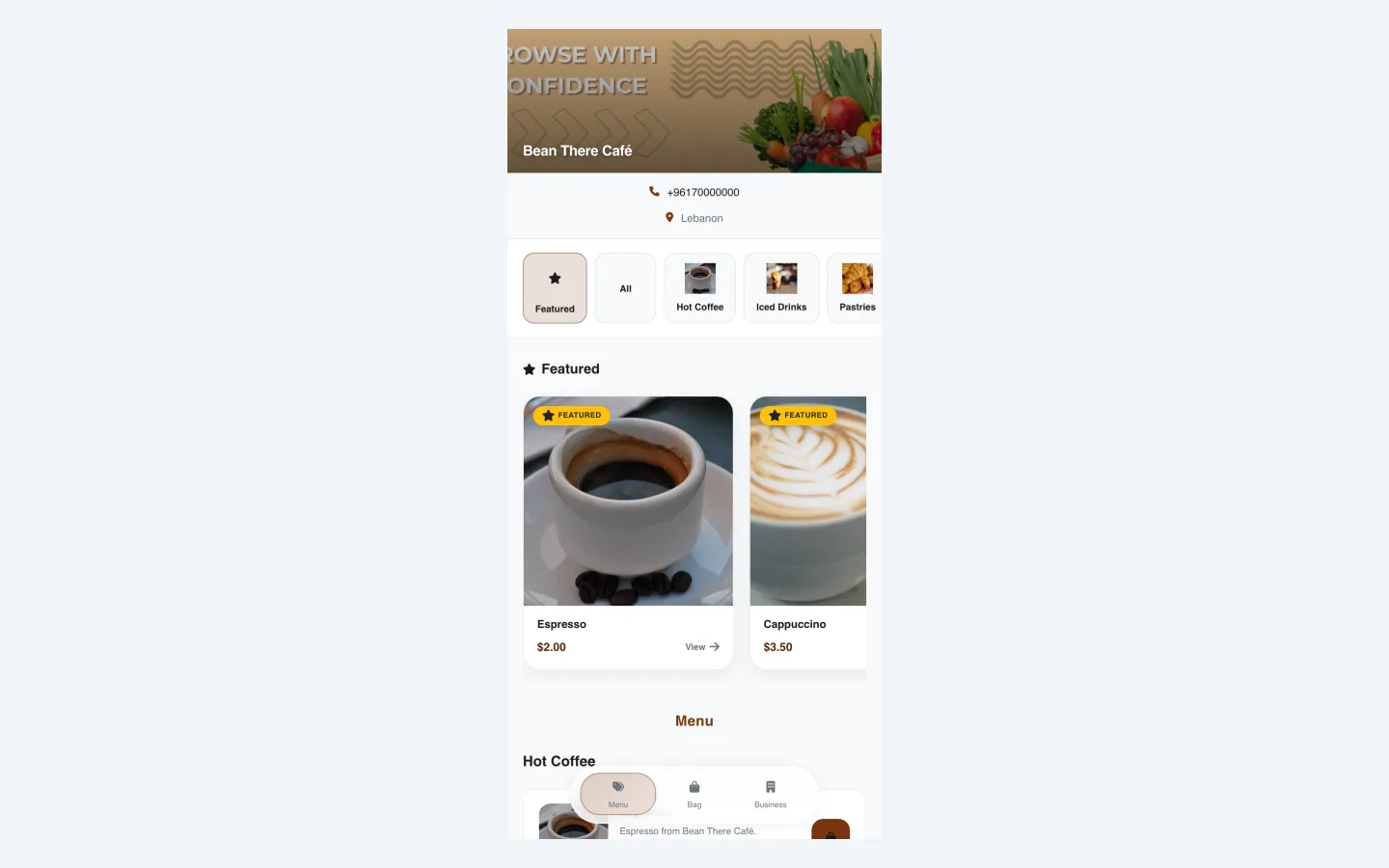
Customers scan to see drinks and pastries with photos and USD/LBP prices. Items you run out of hide automatically.
How it works →Offers and happy hours
Run limited-time offers or buy-one-get-one deals on selected items, applied automatically at checkout.
How it works →Works offline
If the connection drops during the rush, the POS keeps selling and syncs every order once it is back.
How it works →What it looks like

Is YellowPOS the right fit?
A good fit if…
- You run a coffee shop, kiosk, or café with counter service and want checkout to be fast.
- You want to know how much milk, beans, and syrup you actually use per day.
- You sell pastries, beans, or merchandise alongside drinks and want them in the same system.
- You would like a QR menu and online pickup orders without paying for a separate tool.
Look elsewhere if…
- You run a chain of coffee shops and need one dashboard across branches.
- You want a customer loyalty card or points programme built into the POS — it is not available yet.
- You need a kitchen display screen for a separate food station.
How much does it cost?
Every feature on this page is included on every plan. Plans differ by the number of staff accounts and the level of training and support.
Startup
$15/month
1 user · 30-day free trial
Store
$25/month
5 users · training + 24/7 support
Corporate
$50/month
20 users · priority support
Extra users are $5/month each. No commission on sales, no hardware to buy.
Frequently asked questions
What POS do coffee shops in Lebanon use?
Many still use installed desktop systems or a cash box and notebook. A cloud POS such as YellowPOS runs on a tablet or phone at the counter, handles USD and LBP at checkout, keeps selling offline, and includes a QR menu, from $15 a month.
Can I sell the same drink in different sizes?
Yes. Add variants such as Small, Medium, and Large, or milk choices, each with its own price adjustment. The barista picks the option on the POS and the price updates automatically.
Can YellowPOS track coffee beans and milk?
Yes. Add beans, milk, and syrups as ingredients with a unit and cost, then give each drink a recipe. Every sale deducts the ingredients, and the list flags anything running low.
Does the café POS need internet?
Only to load the POS and to upload finished sales. During a cut, orders are saved on the device and sync automatically when the connection returns.
Can customers order ahead for pickup?
Yes. Turn on online ordering for your QR menu and customers can place pickup or delivery orders from their phone, paying cash or by Whish.
How much does it cost?
$15 a month for one user, $25 for five, or $50 for twenty, with no commission on sales. Every plan starts with a 30-day free trial.
Related reading
Put YellowPOS on your counter — free for 30 days
Add a few products, run a test sale on your phone, and see whether it fits before paying anything.
Get started free